Prop firm payouts follow a set order: you trade a funded account, clear the firm’s payout gates and submit a request, then the firm reviews it and sends the payout by bank transfer or crypto. This guide is for funded traders planning a request and for buyers choosing an account by how it pays. FundingTraders is a prop firm, and this guide uses its own accounts as the worked examples. Every funded account here is a simulated funded account, and the trading on it is simulated. You will see how payout cycles work, which payout rules decide whether a request clears, and which minimums and methods apply.
How prop firm payouts work, from funded account to payout
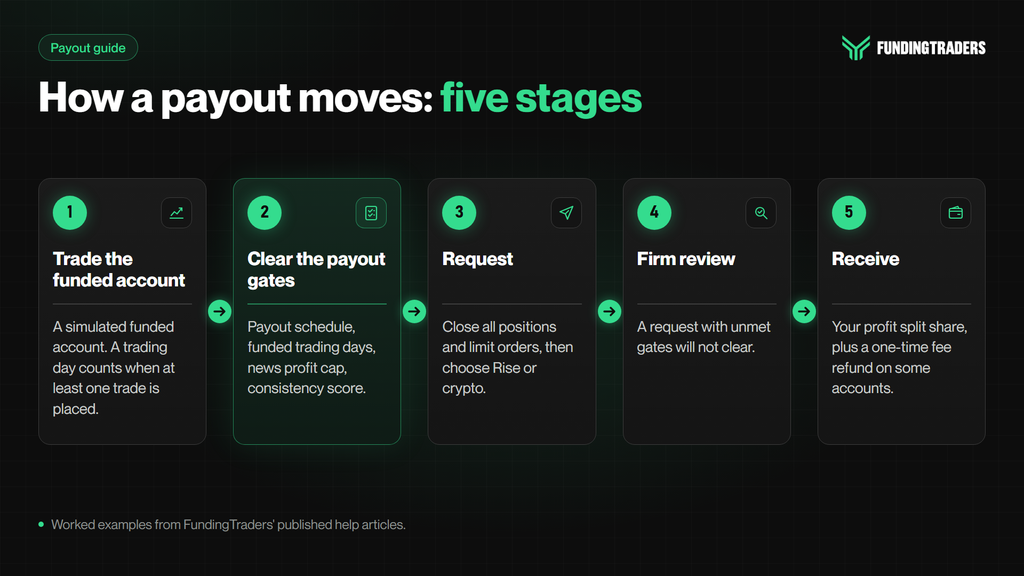
The five stages of a payout
Most prop firm payouts move through the same five stages:
- Trade the funded account. A payout draws on the profit from trades you close in a given period.
- Clear the payout gates. Meet the firm’s conditions, such as a schedule or a number of trading days.
- Request. Submit a payout request from your dashboard and choose a method.
- Firm review. The firm’s review process checks the request against its rules, and this is where any unmet gate surfaces.
- Receive. The firm sends the payout by the method you chose.
What a payout is made of
A payout has up to two parts. The first is your profit split, your share of the period’s profit; the firm retains the remainder. FundingTraders’ default split is 80% on 2-Step Day and Pro10 and 90% on 1-Step Pro, and add-ons at checkout raise it. On 2-Step Swing the split grows instead: “70% on your first payout, 80% on your second and 90% from your third payout onward.” Only paid payouts move you up a step; if a payout is denied, your next payout stays at the same step. The split applies to this funded account only. A new funded account, or a reset, starts again at 70%.
The second part, on some accounts, is a one-time fee refund. The evaluation fee is refunded once, with a qualifying payout, as the 1-Step Pro and 2-Step help articles set out.
Payout schedules: how prop firm payout cycles work
A payout schedule sets when you may ask to be paid: most prop firm payouts run on a fixed cycle or on demand.
Fixed cycles: weekly, bi-weekly and monthly
On a fixed cycle, a payout window opens at a set interval: every 7 days on a weekly cycle, every 14 days on a bi-weekly cycle, and once a month on a monthly cycle. The firm’s payout terms also set where the count starts, and that start date fixes your payout timing. This page explains how cycle types work; it does not rank firms on payout frequency.
On-demand payouts, and what “eligible” means
On an on-demand model there is no fixed calendar: you request whenever the account meets every condition the firm lists. Typical payout requirements are that the minimum trading days are met, any consistency or news-profit limit is within range, open positions and pending orders are closed, and the amount clears the minimum for your method.
“Eligible” means all of them are true at the moment you request. The same test applies on a fixed cycle: you can be past the payout date and still not be eligible. On-demand removes the wait between windows, not the gates.
When your first payout becomes available
To know when you can first get a payout from a prop firm, count from your first funded trade. On FundingTraders 2-Step Day, Swing and Pro10 accounts, “the default first payout is available 21 days after the first trade on a funded account for the trading period.” With the 14-Day Payout add-on (Bi-weekly Payouts at checkout), your first payout is available 14 days after the first trade on your funded account, and “this also applies to all subsequent payouts.” Both the 2-Step Pro help article and the 2-Step Day and Swing help article state this.
For 1-Step Pro, the payout cycle depends on the account and its add-ons; the 1-Step Pro help article sets it out.
KYC comes first: “KYC verification is required only before accessing your funded account.” After that, the payout schedule runs alongside the funded minimum trading days. The Clarity Desk, “available on funded accounts only,” tracks the date as its payout schedule gate: “Days remaining until your next eligible request.”
That makes the 2-Step cycle a checkout choice: 21 days, or 14 with Bi-weekly Payouts, for the first payout and every one after it.

Prop firm payout rules that decide whether a request clears
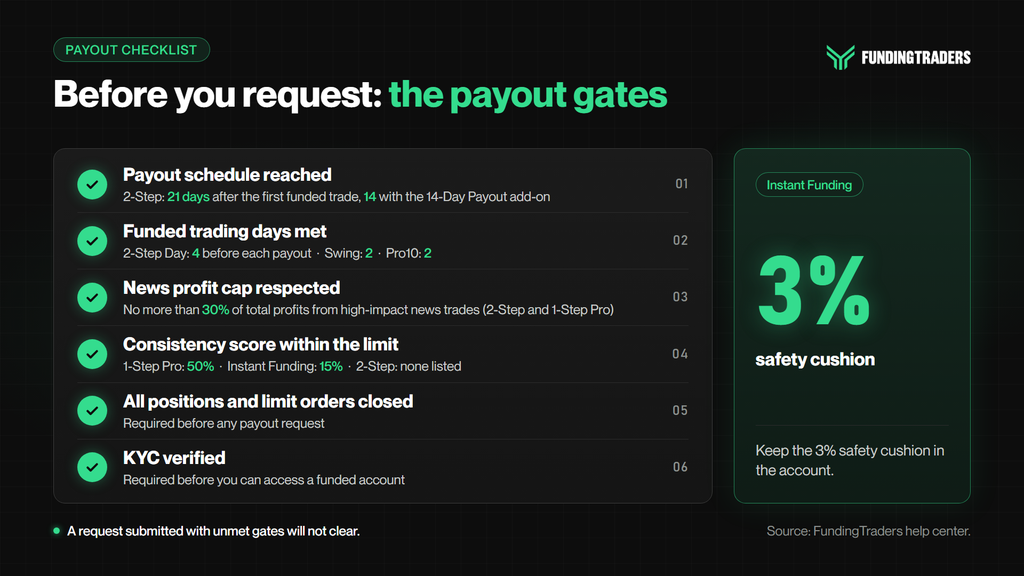
A schedule only opens the window. Whether a request clears depends on the firm’s rules for payouts, which sit inside the wider prop firm trading rules. The Clarity Desk puts it plainly: “The Request payout button stays available, but a request submitted with unmet gates will not clear.” At FundingTraders, four prop firm payout rules sit alongside the schedule.
Consistency score: a payout gate, not a breach
Some firms use consistency rules to limit how much profit comes from one day. FundingTraders’ formula is “(Highest Trading Day Profit / Total Trading Days PNL) x 100 = Consistency Score.” On 1-Step Pro, “a trader’s largest profit day should not exceed 50% of total profits to qualify for payout eligibility.”
The score is a payout gate, not a breach: “If the score exceeds this limit, trading must continue until compliance is achieved.” For worked examples, see how prop firm consistency rules work.
Minimum trading days on the funded account
Minimum days count activity, not calendar time: “A trading day is counted only when at least one trade is placed.” The funded-phase minimums are:
- 2-Step Pro10: “Minimum of 2 trading days”
- 2-Step Day: “Minimum of 4 trading days before each payout”
- 2-Step Swing: “Minimum of 2 trading days”
- 1-Step Pro: The 1-Step Pro help article sets the minimum trading days for each phase.
The 30% news profit cap on funded accounts
On funded 2-Step and 1-Step Pro accounts: “No more than 30% of total profits can be derived from trades influenced by high impact news. If this threshold is exceeded, payout processing will be delayed until additional trades reduce the percentage below the limit.”
A news trade is one “opened, held, or closed” from 5 minutes before to 5 minutes after a red-folder release for that asset. If you are holding positions opened 5 hours or more before a release, they fall outside the rule: “Trades with trade duration of 5 hours or more before the release of any high impact news shall not be considered News Trading.”
Close all positions and limit orders before you request
“All positions and limit orders must be closed before placing a payout request.” The Clarity Desk adds that open positions “are not part of the current period’s closed-trade net, so they do not appear in the payout figure.”
Prop firm payout methods and minimums
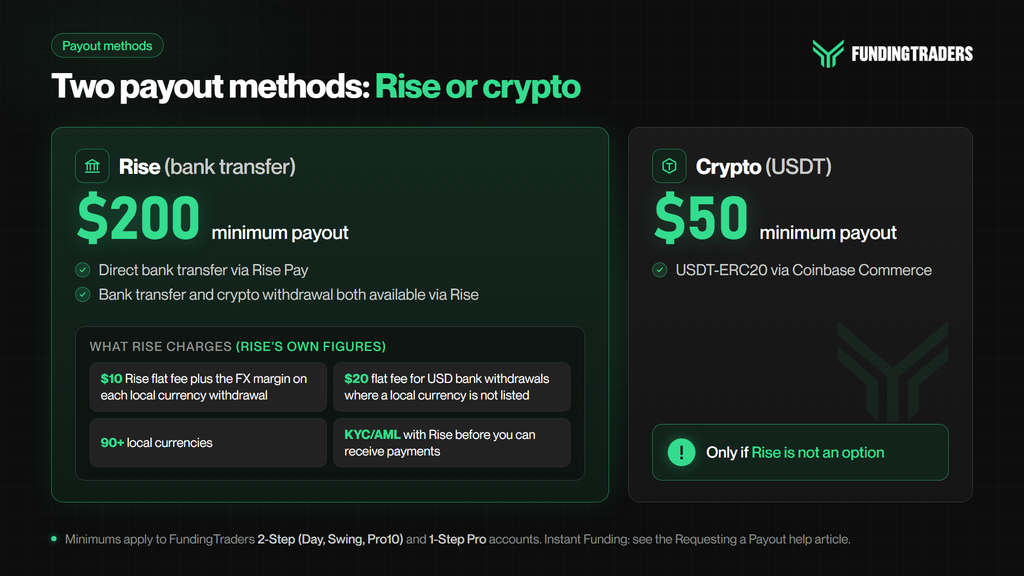
Payout methods and minimums are set out in FundingTraders’ Requesting a Payout help article. The $200 and $50 minimums below apply to 2-Step Day, Swing and Pro10 and to 1-Step Pro.
Bank transfer through Rise, and what Rise charges
Rise (Bank Transfer) is a “Direct bank transfer via Rise Pay” with a $200 minimum payout.
Rise charges its own fees on withdrawals, and the figures below are Rise’s, not FundingTraders’. Rise’s contractor withdrawal guide says: “All local currency withdrawals carry a $10 Rise flat fee plus the FX margin listed. Countries not listed support USD bank withdrawals at a $20 flat fee with no FX conversion.” It adds that “Rise supports withdrawals in 90+ local currencies via bank transfer” and that “All Rise users complete a KYC/AML verification before they can receive payments.”
Crypto (USDT) when Rise is not available
Crypto is the fallback: “Crypto payout available only if Rise is not an option.” Its primary method is USDT-ERC20 via Coinbase Commerce, with a $50 minimum payout.
What happens after you submit a request
2-Step Day, Swing and Pro10 accounts and 1-Step Pro accounts “are automatically reset to their initial balance while a payout request is being processed.” On Instant Funding, where you keep a 3% safety cushion in the account, a request resets the account to the initial balance plus that cushion, as long as you do not include the cushion in your withdrawal. “Requesting a payout that includes the 3% cushion will close your account. The payout itself will still be processed and completed.”
If any of these accounts fails within 48 hours of a payout request, the payout is denied. The Instant Funding maximum loss limit “does NOT reset upon payout.” When you submit, the screen shows “Payout Completed.” to confirm the request was made, a confirmation email follows, and the status sits under “Previous Payouts”.
FundingTraders payout rules by account type
FundingTraders payout rules differ by account type. The table sets the five FundingTraders funded accounts side by side.
FundingTraders payout rules at a glance
| Account | Payout schedule | Default profit split | Consistency score | Funded news cap |
|---|---|---|---|---|
| 2-Step Day | 21 days by default; 14 with the 14-Day Payout add-on | 80% (90% or 100% with add-ons) | None listed | 30% of total profits |
| 2-Step Swing | 21 days by default; 14 with the 14-Day Payout add-on | 70% on the first payout, 80% on the second, 90% from the third | None listed | 30% of total profits |
| 2-Step Pro10 | 21 days by default; 14 with the 14-Day Payout add-on | 80% (90% or 100% with add-ons) | None listed | 30% of total profits |
| 1-Step Pro | Depends on the account and its add-ons; see the 1-Step Pro help article | 90% (100% with an add-on) | 50% | 30% of total profits |
| Instant Funding | Depends on the account and its add-ons; see the Instant Funding help article | Depends on the account and its add-ons; see the Instant Funding help article | 15% | Depends on the account and its add-ons; see the Instant Funding help article |
Data taken from FundingTraders’ published help articles.
Minimums: $200 by Rise and $50 by crypto on the 2-Step and 1-Step Pro rows. For Instant Funding, payout methods and minimums are set out in FundingTraders’ Requesting a Payout help article.
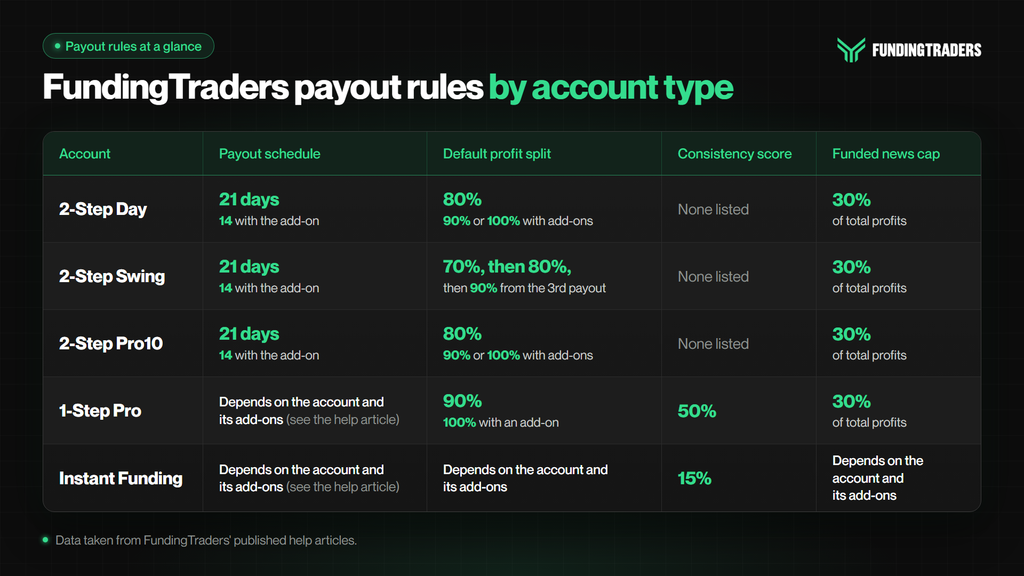
Each row sets its own cycle, gates and split, so pick the account whose payout rules you can meet with your trading style.

Instant Funding payouts: the 15% score and the 3% safety cushion
Instant Funding payouts require a consistency score of 15% or lower and a 3% safety cushion left in the account; the Instant Funding help article lists every condition. The score uses the same formula as 1-Step Pro with a lower ceiling: “If your score is above 15%, keep trading until you are back within the limit.”
On a FundingTraders Instant Funding account, weekend and news holding, the profit split, payout timing and any lot limit depend on the account and the add-ons chosen at checkout, so check the Instant Funding help article before you trade. For the full account rules, see the Instant Funding rules guide.
How to request a FundingTraders payout, step by step
The Requesting a Payout help article sets out the payout process in nine steps:
- Open your dashboard and click the $ icon to go to the Payouts tab.
- Click “Request Payout” and select the account showing available profit.
- Enter your 2FA code, the 6-digit code from your authenticator app.
- Review your payout details: “Check your profit, profit split, and refund amount.”
- Choose Rise or Crypto, then enter the required details.
- Click “REQUEST PAYOUT” to submit.
- “Payout Completed.” appears once the request is made.
- Check your email: “You’ll receive a confirmation with all payout details.”
- Track the status under “Previous Payouts”.
The product help articles also ask you to confirm the request through a link sent to your registered email, after you enter the 2FA code.
Before you start at step 1, run this check to avoid the common mistakes:
- On the Clarity Desk: news profit cap, trading days and payout schedule all met
- Consistency score within the limit (50% on 1-Step Pro, 15% on Instant Funding)
- No open positions or pending limit orders
- On 2-Step and 1-Step Pro, the amount clears the method minimum ($200 by Rise, $50 by crypto)
- On Instant Funding, the 3% cushion left out of the request
FAQ
How do prop firm payouts work?
Prop firm payouts follow five stages: you trade a simulated funded account, clear the firm’s payout gates and submit a request. The firm then reviews it, and a request that clears review is paid as your profit split share by bank transfer or crypto.
How often do prop firms pay out?
It depends on the firm’s cycle: weekly, bi-weekly, monthly, another fixed length, or on demand. FundingTraders 2-Step accounts allow a payout every 21 days by default, or 14 with the 14-Day Payout add-on.
What payout methods do prop firms use?
Prop firm payout methods include bank transfer and crypto. On 2-Step and 1-Step Pro accounts, FundingTraders pays by bank transfer through Rise ($200 minimum). If Rise is not an option, the primary crypto method is USDT-ERC20 via Coinbase Commerce ($50 minimum).
What is the minimum payout at FundingTraders?
On 2-Step (Day, Swing and Pro10) and 1-Step Pro accounts, the minimum is $200 by Rise bank transfer and $50 by crypto. For Instant Funding, payout methods and minimums are set out in FundingTraders’ Requesting a Payout help article.
Does a consistency score stop a payout?
It can hold one back, but it is not a breach. On FundingTraders 1-Step Pro, your largest profit day must not exceed 50% of total profits, and on Instant Funding 15%. Above the limit, you keep trading until you are back within it.
How do I get my first payout from a prop firm?
Reach a funded account and complete KYC, which FundingTraders requires before you access it. On 2-Step accounts, the first payout is available 21 days after the first funded trade, or 14 with the 14-Day Payout add-on, the same cycle as later payouts. Then clear the other gates and request from the Payouts tab.
Planning your first payout
Plan prop firm payouts in the order a request meets them. First, the cycle: on FundingTraders 2-Step accounts, 21 days or 14 with the add-on. Second, the gates: on 2-Step and 1-Step Pro, the funded trading days and the 30% news cap; on every account, any consistency score and no open positions or orders. Third, the method: Rise from $200 or crypto from $50 on 2-Step and 1-Step Pro, plus what Rise charges on its side.
Check those three for each account you are considering before you buy, and your first request becomes a checklist instead of a surprise.

Disclaimer: Trading involves significant risk and is not suitable for every investor. Past performance is not indicative of future results. The information provided in this article is for educational and informational purposes only and should not be considered financial, investment, or trading advice. All account rules, payout structures, profit splits, and promotional offers described in this article are subject to change at the discretion of FundingTraders. Promo codes may expire or be modified without prior notice. Always trade responsibly and only risk what you can afford to lose.